
Microsoft Edge gets a tab navigation feature you won’t find in Chrome


Microsoft Edge is getting an interesting visual change that will allow you to access your browsing tabs in a vertical layout. After a new update, Microsoft says it will allow you to set all your tabs to one side of the screen.

The feature is officially called “Vertical Tabs” and it will allow you to access your tabs from the left side of the display. At the moment, it’s not clear if users will be allowed to change the location of the vertical tabs.


Microsoft Edge vertical tabs feature is currently rolling out to the testers in the Dev and Canary channels.

Vertical tabs feature was first announced in March and it recently began rolling out to a small set of users. After today’s update, you’ll be able to access this new tab navigation experience by clicking on a new icon located at the top left of the tabs.
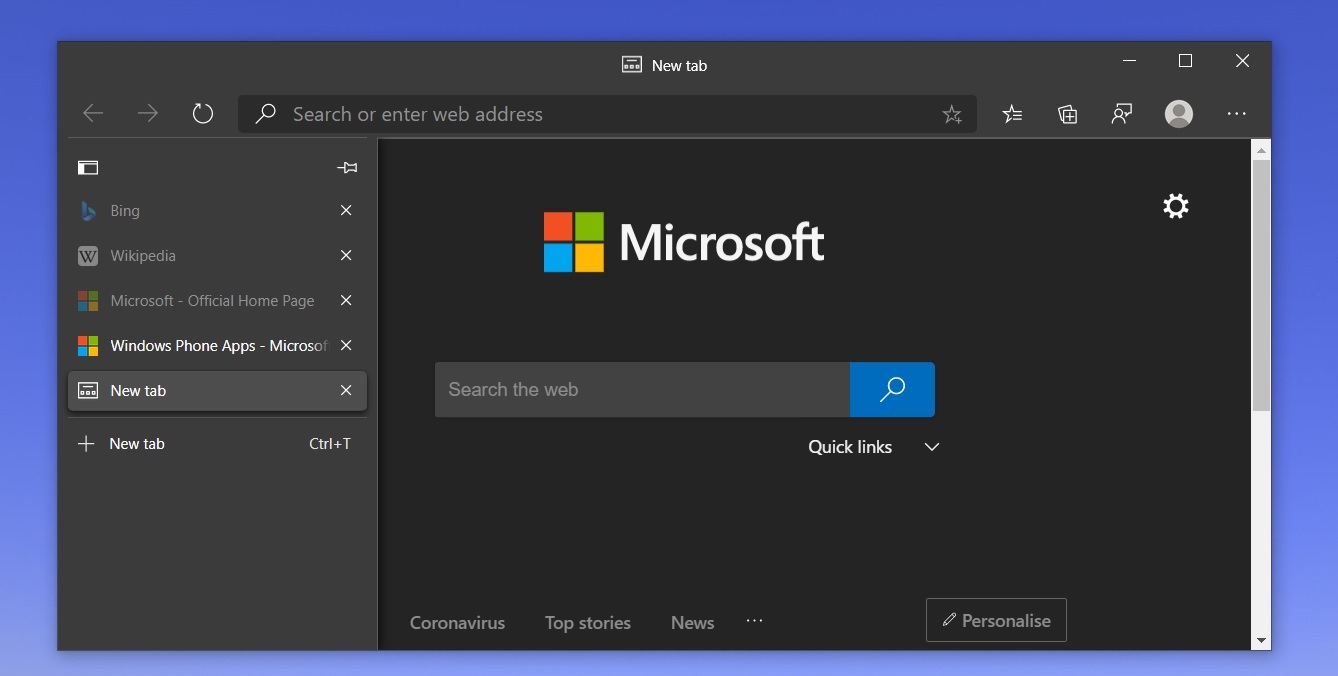


The new button lets you switch between vertical and horizontal layouts. Interestingly, you can also rearrange the tabs vertically. To rearrange the tabs, you can press and hold Ctrl key and select the tabs of your choice, and then you can move the selected tabs within the vertical layout.

The update with the new vertical tabs layout will begin rolling out to Microsoft Edge stable channel later this year.

Comments

Post a Comment

Popular posts from this blog

Microsoft Teams takes on Zoom with free all-day video calling on the web

Microsoft is making a big push to entice fans of Zoom over to Microsoft Teams with a new all-day video calling option that can be used for free. While Microsoft launched Microsoft Teams for consumers on mobile earlier this year, it’s now bringing Teams’ friends and family features to the desktop and web allowing you to create a Microsoft Teams meeting for up to 300 friends and family that can run all day free of charge. You won’t need a Microsoft Account or the Microsoft Teams app to join calls, as you can join free via a web browser. Microsoft Teams will also support seeing up to 49 friends or family members in a gallery view or through its Together Mode feature that puts you side by side in a virtual environment.  Microsoft Teams on the web. It’s clear Microsoft is positioning Teams as a way for families to connect virtually during the pandemic. Zoom surged in popularity earlier this year after thousands of people flocked to the video calling service to connect to coworkers, fel...

Microsoft Edge Web Browser Gets Sharper

For better website compatibility Microsoft has entirely revamped the Edge web browser, using Chromium underneath. Users can go to Microsoft's Edge Download page to get it. The browser will eventually be rolled out to all users via Windows Update. It will continue to offer unique features, with powerful privacy options, home-page customizations, an immersive reading view with lifelike voices for text-to-speech, and a nifty Collections feature for web research leading the way. For a look at Microsoft's future plans for the web browser, read What's New in Microsoft's Edge Browser. The move should result in more site compatibility, but I'm concerned that it will further consolidate Google's ownership of the Internet, since the search ad giant controls the Chromium project. One side-benefit to Microsoft's decision is that it plans to offer Edge for macOS and older Windows versions as well as Windows 10. A Linux version is also planned. Edge remains the only brows...